
01 / HOME
Your starting point.
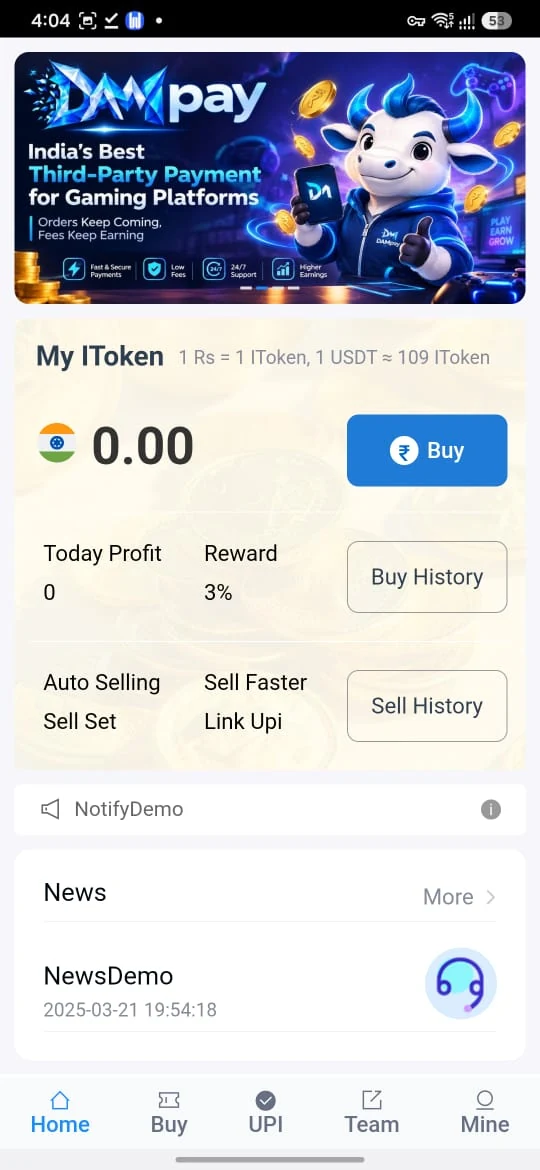
My IToken, buying and selling shortcuts and the 3% label.
Know the screens. Understand IToken.
Keep your code and next step in one place.
Compare this with the prefilled Invitercode field on the app page.
*Supplied screen examples. The app header rounds USDT to ≈109; its illustrated 1 USDT output is 109.10.
A guide to the app, from first access to order history.
Explore all 16 topicsStart with the question you want answered. Each guide takes a closer look at one part of Dma Pay.
Home, UPI Buy, USDT and Mine, explained from the supplied screens.
Read the app guideThe ₹500 listing, 3% reward and separate USDT illustration.
Explore the examplesWeb access and the current Android download information.
Read the access guideThe supplied UPI Buy listing shows a 3% reward. Read Price, Reward and IToken together so the three fields stay distinct.
What each number meansThe total illustrates in-app tokens, rather than a confirmed bank credit.
The supplied Home, UPI Buy, USDT and Mine views. Open each image for a closer look.
My IToken, buying and selling shortcuts and the 3% label.
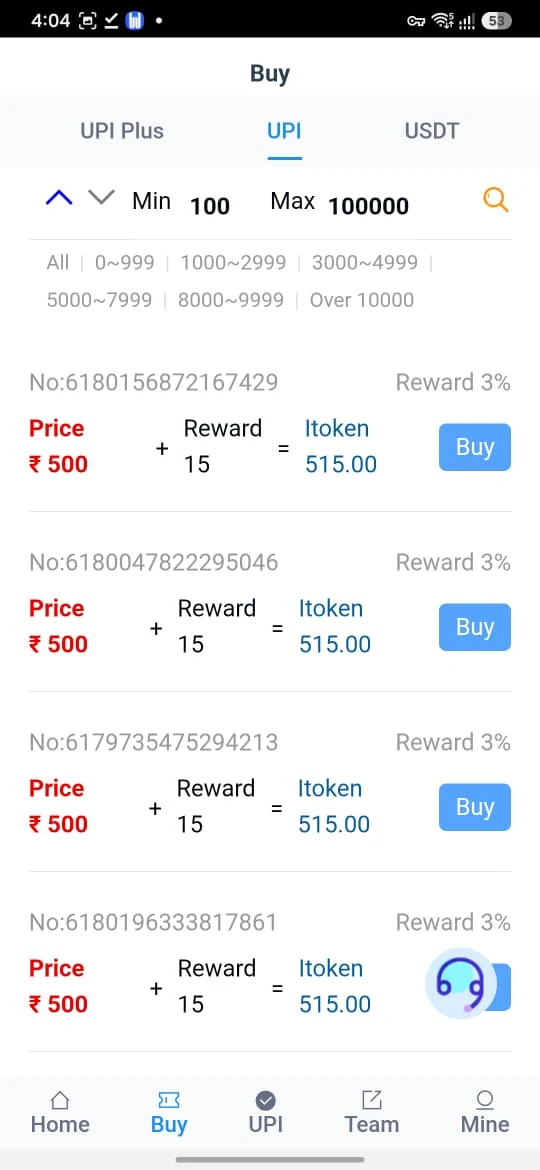
₹500 price, 15 reward and 515.00 IToken.
1 USDT illustrates 109.10 IToken; TRC-20 network.
Buy, UPI Sell and Transfer IToken history, plus Service.
Screenshots illustrate the interface. Current offers, balances and available features can change.
Keep the invitation code ready, then choose the access route for your account.
Registration guideकोड कॉपी करें → ऐप खोलें → जानकारी पढ़ें
Use GnvlsPEULl exactly as shown, including its letter case.
Choose registration, web login or the Android access guide.
Check the rate, eligibility and relevant order before taking action.
Choose the 3% UPI listing example or the separate USDT illustration. Each result stays in IToken, with its own assumptions.
The app’s header rounds the USDT relationship to ≈109. The illustrated one-USDT output is 109.10.
Read the calculator assumptionsSeparate UPI and USDT examples. USDT uses the illustrated 109.10 output; the app header rounds it to ≈109. Fees and current eligibility are excluded.
The supplied Dma Pay screens and observed public access pages, explained one topic at a time.
The supplied Dma Pay screens show an IToken balance, UPI buying listings, a USDT conversion screen, selling shortcuts and account-history tools. The bottom navigation contains Home, Buy, UPI, Team and Mine. This guide explains the visible labels and links to the supplied app-access destination.
The Home and Buy examples show a 3% order reward. The Home headline rounds the USDT relationship to approximately 109 IToken, while the separate USDT entry screen illustrates 109.10 IToken for 1 USDT. These are screen examples; the current order determines its quote and conditions.
dmapayapp.org is an independent informational and promotional guide. It does not operate the external app, receive deposits or complete orders.
Explore the four supplied app screens →The supplied logo reads DAMpay; the public access page title reads DmaPay. This guide uses Dma Pay for the brand and dmapayapp.org for its domain. You may also see the name separated as DAM Pay. Similar lettering alone does not establish that two apps or websites have the same operator.
| Looking for | Read here |
|---|---|
| Dma Pay app and IToken | Illustrated app guide |
| Dma Pay registration and invite code | Registration walkthrough |
| Dma Pay login or password help | Web login · Password help |
| Dma Pay APK download | Android access information |
The supplied external app destination is dmapay.skin. This informational website uses dmapayapp.org. Check the full destination before entering account information.
Use the हिन्दी ऐप गाइड for a Hindi explanation. The guide and its calculator do not require an app password or access to your account.
The supplied referral link contains invitation code GnvlsPEULl. During the public-page check on 10 November 2026, it opened a registration form with that code already filled in the disabled Invitercode field.
This website does not collect signup details or complete verification. No account was created while preparing this guide.
Registration details and copyable code →The registration page’s Go login control leads to the public web-login view. Its observed fields ask for a phone number and password. Use your existing account details on that external platform.
The observed Forgot password control opens a Modify password Form with Phone, Password and Confirm fields. The page may impose further requirements after submission; this guide has not tested the reset process.
The Mine screen separately includes Modify Password. An app password is different from a bank or UPI PIN. Keep passwords and verification codes private.
The Android download page explains the available access route. A separate APK file or direct APK destination was not supplied or verified for this release. The download button therefore opens the supplied app-access page, rather than an unrelated file or mirror.
No package name, APK hash, file size, minimum Android version or Play Store listing has been established here. No APK was installed or run.
Android references: App-download guidance · Play Protect information.
| Guide website | dmapayapp.org |
|---|---|
| External app destination | dmapay.skin |
| Invitation code | GnvlsPEULl |
| In-app unit | IToken; Home labels 1 Rs = 1 IToken |
| UPI listing example | ₹500 + 15 reward = 515.00 IToken |
| Reward label | 3% on the supplied Home, Buy and Mine screens |
| USDT example | Header ≈109; illustrated 1 USDT output 109.10 IToken |
| Visible USDT network | TRC-20 · Tron network |
| Supplied Telegram | @real_ukpay |
The ₹1-to-IToken label describes the app’s displayed unit relationship. It does not establish a cash-withdrawal rate, current market value or guaranteed bank credit.
The interface groups several tasks into separate screens. Knowing the labels can make it easier to find the relevant record or understand an example:
This guide adds a copyable invitation code, screenshot enlargement, English/Hindi explanations and a calculator. Those guide tools work without connecting to an app account.
The supplied Buy screen has UPI Plus, UPI and USDT tabs. The UPI view shows a Min 100 / Max 100000 filter and several ₹500 listings. Those visible filter labels do not establish every account’s transaction eligibility.
| Price | Reward | IToken total |
|---|---|---|
| ₹500 | 15 (3%) | 515.00 |
Read the current listing’s full details and keep its reference for Buy History. A listing is not evidence of a completed payment or token credit.
The illustrated input of 1 USDT shows an output of 109.10 IToken and TRC-20 / Tron network. Its instructions say to enter an amount, choose Continue and read the order-page instructions. Current quotes, networks and fees must be checked on the platform.
Do not add the 3% UPI reward to the USDT estimate. Try the separate reference calculations.
The Home screen includes Auto Selling / Sell Set, Sell Faster / Link Upi and Sell History. Mine includes a distinct UPI Sell History entry. The supplied images do not show a full sell-order form, settlement time or current cash-conversion quote.
The Buy listing’s reward does not establish a Sell reward. A token balance or status screen does not independently confirm money arriving in a bank account.
The visible 3% reward is illustrated by a ₹500 listing with 15 reward IToken and a 515.00 total. It is an order example, rather than a daily interest rate, recurring-income promise or verified payout record.
The supplied link contains invitation code GnvlsPEULl. A person associated with an invitation link may benefit under the platform’s rules. No referral commission percentage, fixed signup bonus or team-level reward was established by the supplied screens.
For an offer in the app or its Event Center, read the qualifying action, eligible account type, expiry, reward unit and crediting conditions. Keep promotional figures separate from actual balance and completed history.
Read the reward and IToken examples →Check the actual destination before sharing information with an app, file or support account. A familiar name, logo, Telegram handle or government-resource link does not verify an operator or guarantee an outcome.
For general payment-safety information, read NPCI fraud awareness. RBI, Income Tax and NPCI links are independent resources; their inclusion does not imply endorsement of Dma Pay.
| Method | Visible information | Check on the platform |
|---|---|---|
| UPI Plus | A Buy tab; no separate selected view supplied | Availability and current conditions |
| UPI Buy | ₹500 + 15 reward = 515.00 IToken | Current listing and final order details |
| USDT | 1 USDT output 109.10 IToken; TRC-20 | Current quote, supported network and fees |
| UPI selling | Home shortcuts and UPI Sell History | Current selling requirements and record status |
The supplied material does not establish card payments, a separate Bank Sell History, another USDT network or a fixed settlement time. Use the active order’s details, rather than reusing a wallet address from a screenshot or message.
| Problem | Next check |
|---|---|
| Access page does not open | Check your connection and note the exact error at the supplied destination. |
| Login is rejected | Use the account’s registered phone and password, or its Forgot password route. |
| Invitation code differs | Compare GnvlsPEULl carefully; remove spaces and preserve letter case. |
| Copy button is unavailable | Select the visible code and use your device’s Copy action. |
| No APK option is visible | Use web login or ask the platform’s own service about current Android availability. |
| Installation is blocked | Read the security message and review the file and publisher information. |
| An order is pending | Check Buy or UPI Sell History and keep its reference for service. |
| Calculator shows a dash | Use 0.01–1,00,000 INR or 0.01–10,000 USDT, with up to two decimal places. |
When requesting help, include the relevant screen name and error text with private details masked. This guide cannot access app records or reverse a payment.
The Telegram link was supplied for this website; listing it does not verify that it is the app operator or a bank service. No separately verified customer-care phone number or email was supplied.
Help and contact details →Invitation access, Android availability and the figures in the supplied screens.
The supplied Dma Pay screens show an IToken balance, UPI buying examples, a USDT entry screen, selling shortcuts and account-history tools. dmapayapp.org is an independent guide to that material and the supplied access link.
The code is GnvlsPEULl. Preserve its uppercase and lowercase letters. The supplied referral page showed that code prefilled in its Invitercode field during the public-page check.
Open the supplied referral link. The observed form includes Phone, Password, Confirm, a prefilled Invitercode and slider verification. Review and complete the platform’s own requirements yourself.
Web login was observed at dmapay.skin/#/login. Its Forgot password control opened dmapay.skin/#/editpassword, with a Modify password Form. No login or password reset was completed for this guide.
The supplied Buy listing shows ₹500 price, 15 reward and 515.00 IToken. The 15 reward equals 3% of 500. This is an order example, not a daily return or guaranteed bank credit.
The Home and USDT headers show an approximate 109 IToken relationship. The USDT screen’s entered 1 USDT illustrates 109.10 IToken. The calculator uses that illustrated output; the live platform quote determines any current result.
The two examples are separate. This guide’s USDT estimate multiplies the amount by 109.10, excludes fees and does not add the UPI reward.
The supplied USDT screenshot shows TRC-20, described as Tron network. It does not establish other networks or current deposit instructions.
The Android guide links to the supplied app-access page. No separate APK file or direct APK URL was supplied or verified, so no package metadata or inspected binary is included in this release.
Mine shows UPI Sell History, Buy History, Transfer IToken History, Event Center, Tutorial, Official Service and Modify Password. Use the relevant current platform option for account or order questions.
The supplied Telegram destination is @real_ukpay. Listing that channel does not verify an operator or bank relationship. Use the platform’s own service for app issues and your bank or payment app for bank-payment questions.
This guide has no account-login or payment form. Its calculator runs in the browser, and its links open external services. It does not access an app account or process transactions.
Copy the referral code, then open the access page.
Android access and download information →Compare this with the prefilled Invitercode field on the app page.
General banking, UPI and tax information from their own sources.
These are independent reference links. They do not imply affiliation, approval or endorsement of Dma Pay.